
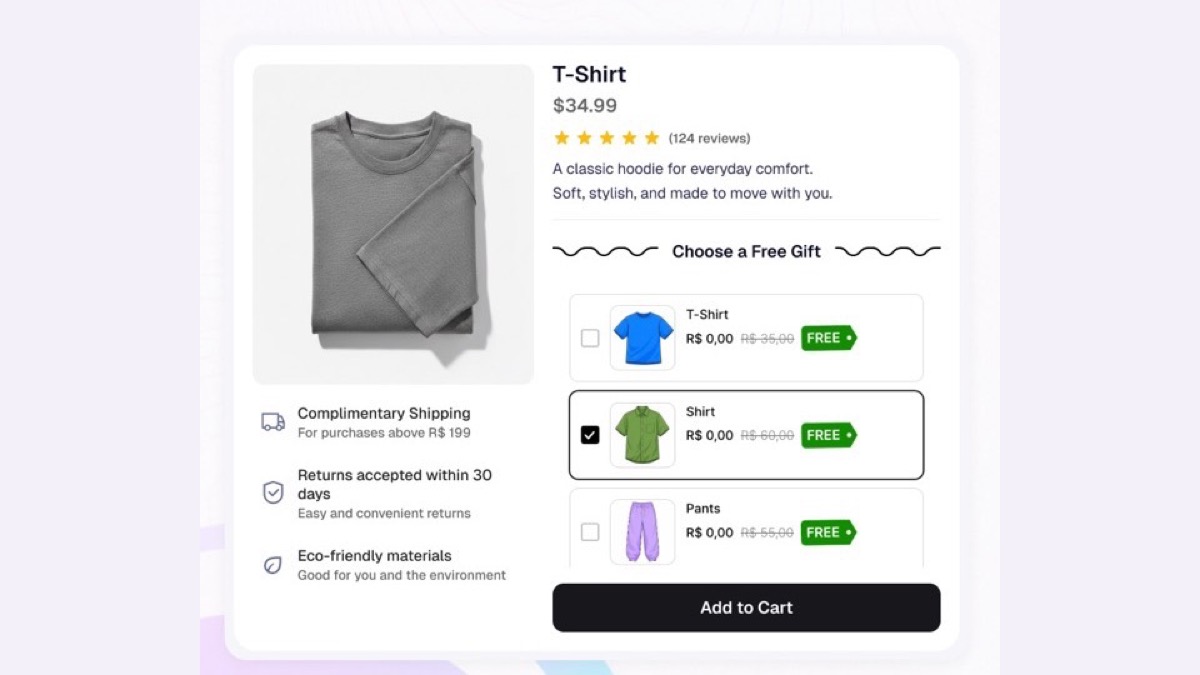
A Shopify free gift with purchase is an item the shopper gets at no cost when the order meets a rule you set, such as spending $75 or buying a product from a collection. Shopify can do it without an app through a Buy X Get Y discount set to free. The catch is that Shopify never puts the gift in the cart. The shopper has to find it and add it, so anyone who misses your banner checks out without it. Gift apps fix that part by adding the gift for them. With Black Friday on November 27, 2026 and Cyber Monday on November 30, there’s still time to set one up either way.
We build Unlimited Bundles & Discounts, and gift bundles are one of its bundle types, so we’re not neutral here. Everything below about Shopify’s own discounts comes from Shopify’s help center and changelog, checked on November 20, 2026.
Why a free gift instead of a deeper Black Friday discount?
A sitewide discount costs you the same share of every order. A gift costs you what you paid for it, while the shopper sees its retail price. On Black Friday, Adobe’s 2026 holiday forecast expects discounts to peak at 23% off list price for apparel and 29% for toys. A gift lets you stand out that week without matching those cuts on every product.
A gift can also lift the order value. If most of your orders land around $60, putting the gift at $75 gives shoppers a reason to add one more item.
How to set up a Shopify free gift with purchase without an app
Here’s how to do a free gift with purchase on Shopify with nothing but your admin, in four steps.
1. Create the gift as a product
Give it a real price and track its inventory, so every gift that ships comes off your stock. Then set its status to Unlisted. Shopify added that status in October 2025: the product stays for sale, but it’s hidden from your store’s search, collections, recommendations, internet searches and Shopify Catalog. Shoppers reach it only through a direct link, the one you’ll put in your Black Friday banner.
2. Create a Buy X Get Y automatic discount
In the Shopify admin, go to Discounts, create a discount and pick Buy X get Y. Choose Automatic discount, so nobody needs a code. Under Customer buys, choose a minimum purchase amount (spend $75) or a minimum quantity of items from the products or collections you pick.
3. Make the gift free and limit it
Under Customer gets, add the gift product and set the discount to Free. You can list several gift products here, and the shopper gets the one they add. If each order should get one gift, set the maximum number of uses per order to 1.
4. Schedule it for BFCM
Set the start date for the morning your sale opens and an end date after Cyber Monday. Shopify’s Buy X Get Y help page is clear that a discount without an end date never expires, so a forgotten Black Friday free gift keeps giving through December.
The catch: the gift isn’t added to the cart
In Shopify’s own words, the “get” item “is never automatically added to the cart.” A shopper who spends $80 and never adds the gift pays for the order and receives nothing extra. A shopper who adds the gift without reaching $75 sees it at full price in the cart. Your banner, product pages and cart need to tell people the gift exists and link to it.
Shopify Buy X Get Y or a gift with purchase app?
The Shopify column comes from its help center, and the app column shows how gift bundles in our app work today.
| Shopify Buy X Get Y, no app | Gift bundles in Unlimited Bundles & Discounts | |
|---|---|---|
| Gift goes into the cart | No, the shopper has to add it separately | Yes, automatically, with the main add to cart click |
| Offer shown on the product page | Only if you add the text | Yes, as a list of gifts above add to cart |
| Shopper chooses between gifts | Yes, by finding and adding one | Yes, by ticking one in the list |
| Gift shown at $0 in cart and checkout | Yes, once the order qualifies | Yes |
| Gift free only with the products that earn it | Yes | Yes |
| Combines with other discounts | Set on each discount | Product, order and shipping discounts allowed until you change it |
| Gift stock tracked | Yes | Yes |
| What you set up | 1. A Buy X Get Y discount 2. A banner announcing the gift 3. Links to the gift’s product page |
A gift bundle in the app |
If you sell a handful of products and can put the gift in front of shoppers with a banner, the free route is enough for Black Friday. A gift with purchase app earns its place when shoppers should see and pick the gift without hunting for it, and when the gift should go into the cart with the product. That’s the case we built gift bundles in Unlimited Bundles & Discounts for, and it’s the app we recommend when you need both.
How gift bundles work in Unlimited Bundles & Discounts
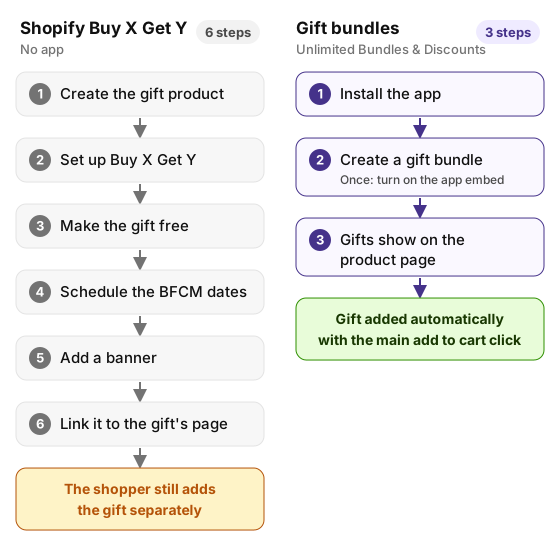
Without an app, a free gift takes six steps and the shopper still adds the gift by hand. With gift bundles it takes three, and the gift goes in with the main add to cart click.
In our app, a gift bundle is a free gift attached to the products you choose. You decide where it shows: on every product, on the products you pick, or on the products of the collections you pick. Then you add the gifts shoppers can choose from. The gift is always free.
On the product page, the shopper sees the gifts in a list above the add to cart button and ticks the one they want. When they add the product to the cart, the gift goes in with it.
The discount runs on Shopify Functions, Shopify’s own discount system, so the gift shows at $0 in the cart and at checkout. If the product that earned the gift leaves the cart, the gift goes back to its full price, so it never ships free on its own. You choose which other discounts it combines with, which matters when a sitewide Black Friday code is running at the same time.
There’s still time to have it live before Friday. Install the app, create a gift bundle, pick the products it shows on and add your gifts. Every bundle type, gift bundles included, is available on every plan.
Shopify Black Friday checklist for a free gift
Count your gifts first. If they sell out mid-weekend, will you swap in a second gift or end the offer early? Decide now.
Test the full path on your phone. Adobe expects 63% of online spending on Thanksgiving to happen on mobile. Add a product, open the cart drawer and check the gift shows at $0 before checkout.
Try the express buttons. Shop Pay and other accelerated checkout buttons on the product page skip the cart, so a gift the shopper had to add by hand won’t be in that order.
Check how the gift combines with your other Black Friday discounts. Shopify only stacks discounts that allow each other, as its page on combining discounts explains. Place one test order with your sitewide code and the gift together.
Look at AI shopping channels. Shopify’s Agentic Storefronts are on by default for eligible stores and let shoppers buy from ChatGPT, Google AI Mode, Gemini and Microsoft Copilot. Those shoppers may never see your product page or your banner, so don’t promise the gift anywhere they can’t claim it.
Questions merchants ask about free gifts on Shopify
Can Shopify automatically add a free gift to the cart?
Not with its own discounts. Shopify’s help center says the free item in a Buy X Get Y discount is never added to the cart for the shopper. To automatically add a free gift to the cart on Shopify, you need an app. In our app, the gift the shopper ticks goes into the cart with the product they add.
Does a free gift come off inventory?
Yes. The gift is a real product on its own order line, so stock comes off it like any other sale, with or without an app.
Can I run a free gift only during Black Friday weekend?
Yes. Set both a start and an end date on the discount. Gift apps usually have their own schedule.
Can the gift be a product I already sell?
Yes. Any product can be the gift, in a Buy X Get Y discount or in a gift app. Keep it Active instead of Unlisted if shoppers should also be able to buy it on its own, and watch its stock, since gifts and paid orders now draw on the same units.
What’s the difference between a free gift and BOGO?
BOGO gives a second unit, or a related product, free or discounted when the shopper buys the first. A free gift is usually a separate item, often one you don’t sell on its own. We cover BOGO and the other bundle types in Shopify Bundles app: its limits and when to use a bundle app, and paid extras in Shopify product add-ons.
Setting up a gift before Friday and stuck on a step? Ask us in live chat. The people who build the app answer it, including questions about Shopify’s own Buy X Get Y.