
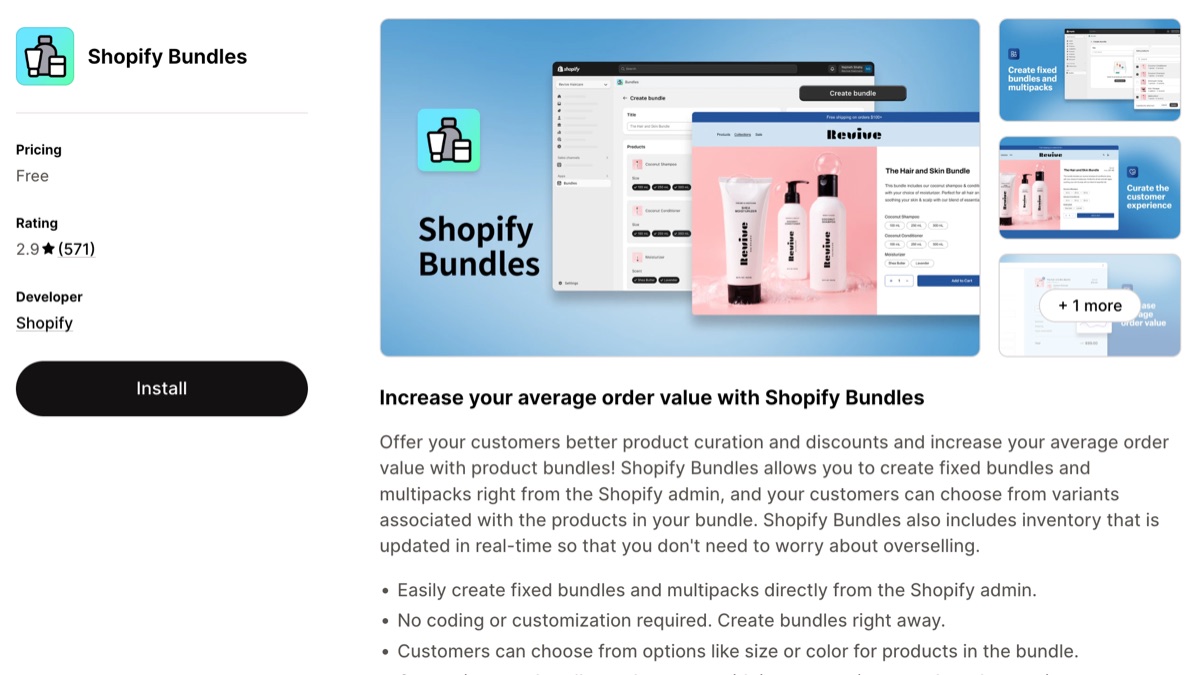
The Shopify Bundles app is Shopify’s own free app for bundles, and it’s made for stores that are just starting with them. It turns a fixed set of products into one bundle product, or sells a multipack of the same item, and that’s about it. There are very few customization options and no widget: nothing shows the offer on your other product pages, so the bundle is one more product in your catalog. Once shoppers should pick their own items (mix and match), pay less as they buy more (quantity breaks), or see BOGO, add-ons and free gifts next to the add to cart button, you need a third-party Shopify bundle app.
We’ve built Unlimited Bundles & Discounts, one of those third-party apps, since 2018, so keep that in mind as you read. Everything below about Shopify’s app comes from Shopify’s help center and its App Store listing, checked in November 2026, so you can verify it yourself.
What the Shopify Bundles app does
You pick the products, set one price, and Shopify creates a new bundle product. Shoppers can still choose a size or color for each item inside it. When the bundle sells, the order lists the individual SKUs, and stock comes off each product in the bundle.
The limits, from Shopify’s documentation:
- Up to 30 products in a fixed bundle, with at most 3 options and 100 variants per bundle.
- It sells in the Online Store, Shop, Shopify POS and headless storefronts.
- Your store needs Shopify’s upgraded checkout.
What you can change is the bundle’s own product page: its images, variants and options. The listing names one integration, the Shopify admin, and describes no theme block or widget, so the offer never appears on the pages of the products inside the bundle. Shoppers only find it if they land on the bundle product itself.
What the Shopify Bundles app can’t do
Mix and match and quantity breaks are the two big gaps, and even fixed bundles have limits of their own. Each point below comes from Shopify’s own help pages:
- Mix and match. Shopify says bundles where the customer chooses from a set of products need a third-party bundle app, or the Bundles API if you’re on Shopify Plus.
- Quantity breaks. The app has no “buy 2, save 10%; buy 3, save 15%”. Shopify’s regular discounts don’t have a tiered type either, so you would create one automatic discount per tier, and the product page wouldn’t show shoppers the tiers.
- Prices that follow your products. When a product in the bundle changes price, the bundle price stays the same until you edit it by hand.
- Subscriptions and pre-orders. Bundles don’t work with purchase options or the Shopify Subscriptions app, and a bundle can’t contain another bundle.
- Inventory per location. Stock is tracked across all locations combined.
- Bulk changes. There’s no import, export or bulk editing of bundles.
Who helps you when it breaks?
Shopify Bundles has no support channel of its own: the listing points to the help center FAQ, and this is where the two kinds of app differ most. On the App Store it has a 2.9 out of 5 rating from 571 reviews, and several of its recent 1 and 2 star reviews describe bugs that stayed unresolved. One merchant wrote in January 2026: “Shopify won’t help me, no one knows how to do it.” None of the low reviews we read had a reply from Shopify.
With a third-party app you can usually talk to the team that makes it. For ours, that’s live chat and email with the people who build the app. Our average reply time is 2 hours, and we answer every ticket within 24 hours.
Can you do BOGO on Shopify without an app?
Partly. Shopify has a built-in Buy X Get Y discount, so a basic buy one, get one works without installing anything. The catch is written in Shopify’s help page: the free or discounted item is never added to the cart for the shopper. They have to know about the offer and add both items themselves, and nothing on the product page tells them it exists.
What a Shopify bundle app adds
Third-party bundle apps work with the products you already have. They show the offer on the product page, with a design you can change, and apply the discount in the cart. In Unlimited Bundles & Discounts, that means:
- Quantity breaks and volume discounts, shown as tiers above the add to cart button.
- Mix and match bundles and build-your-own bundle pages.
- Standard bundles of different products, and add-on bundles where shoppers tick the extras they want.
- Buy X Get Y, free gift and free shipping offers.
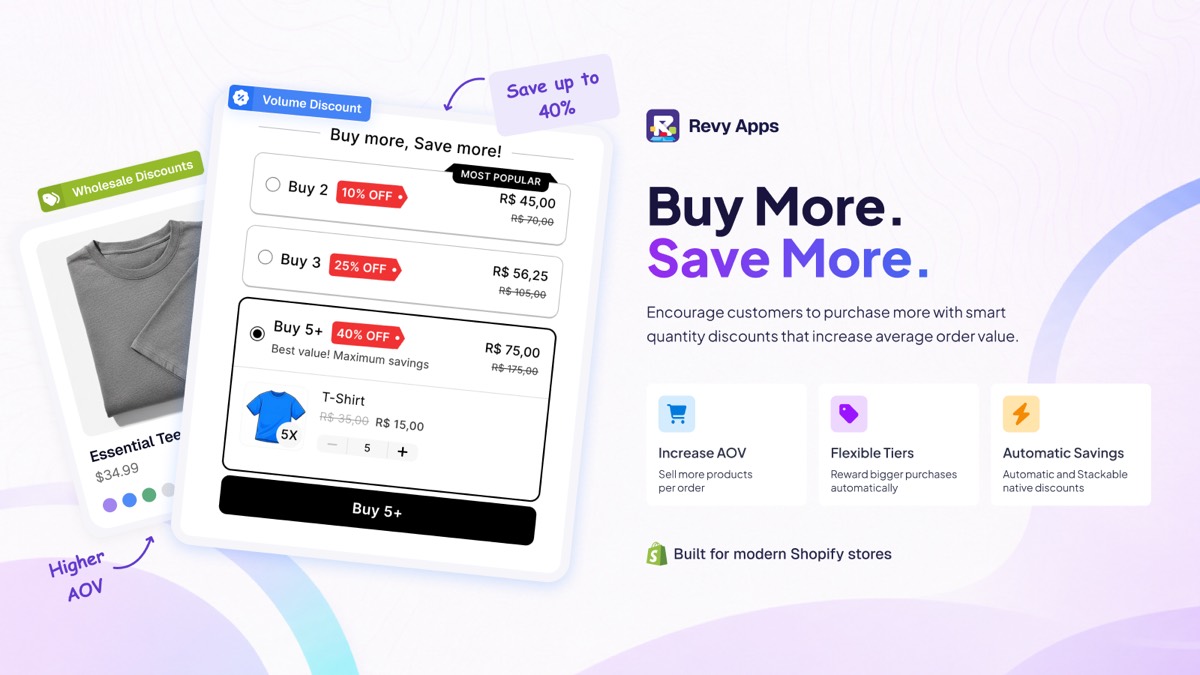
The discounts run on Shopify Functions, Shopify’s own discount system, so they apply in the cart, at checkout and in Shopify POS. If a shopper qualifies for several bundles in one order, they’re combined into one discount, and they stack with your other automatic discounts.
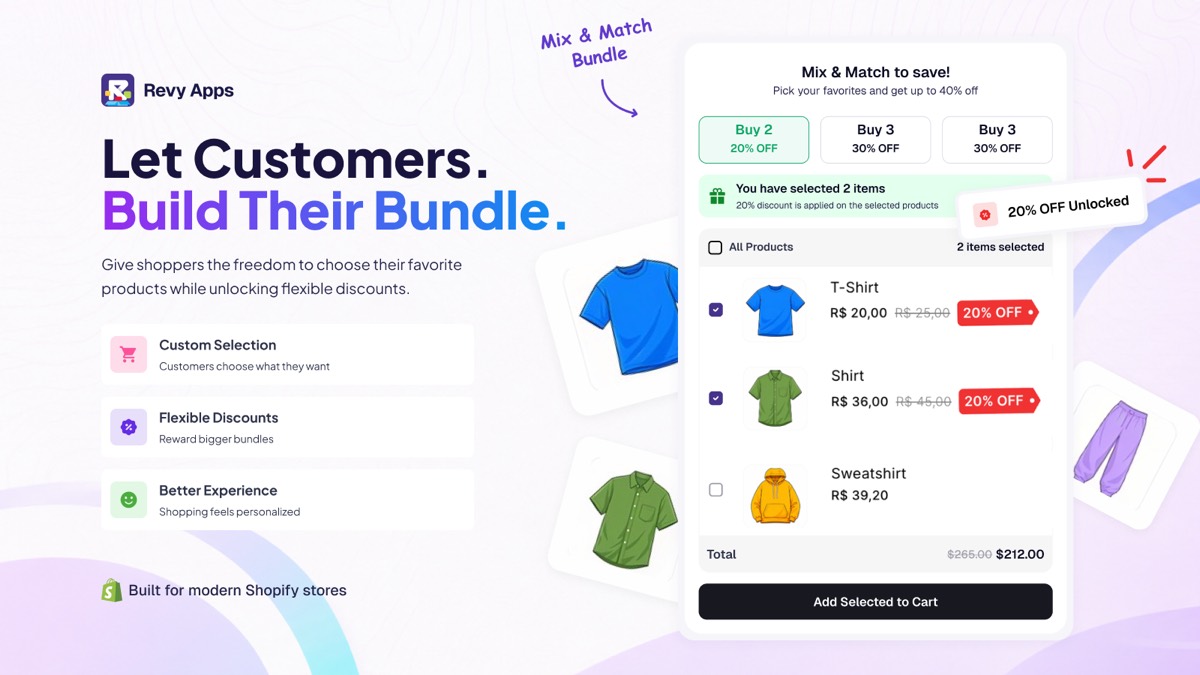
The widget’s look is set on the app’s Appearance page, with a custom CSS editor for the details. Some bundle types can also be published as a bundle product of their own, like Shopify’s app does, with the bundle’s stock calculated from the items inside it.
Gift bundles and add-on (upsell) bundles
These two have no equivalent in Shopify’s app, because both live on the page of a product you already sell instead of on a separate bundle product.
A gift bundle puts a “Choose a Free Gift” list above the add to cart button. The shopper ticks the gift they want, it goes into the cart with the product, and the discount makes it free. The offer can show on all your products, or only on the products and collections you pick.
An add-on bundle, also called an upsell bundle, works the same way, except the extras are discounted instead of free. Think of a T-shirt page offering socks and a beanie at 30% off. Each add-on can be ticked by default, required, or set to follow the main product’s quantity, so two shirts bring two pairs of socks.
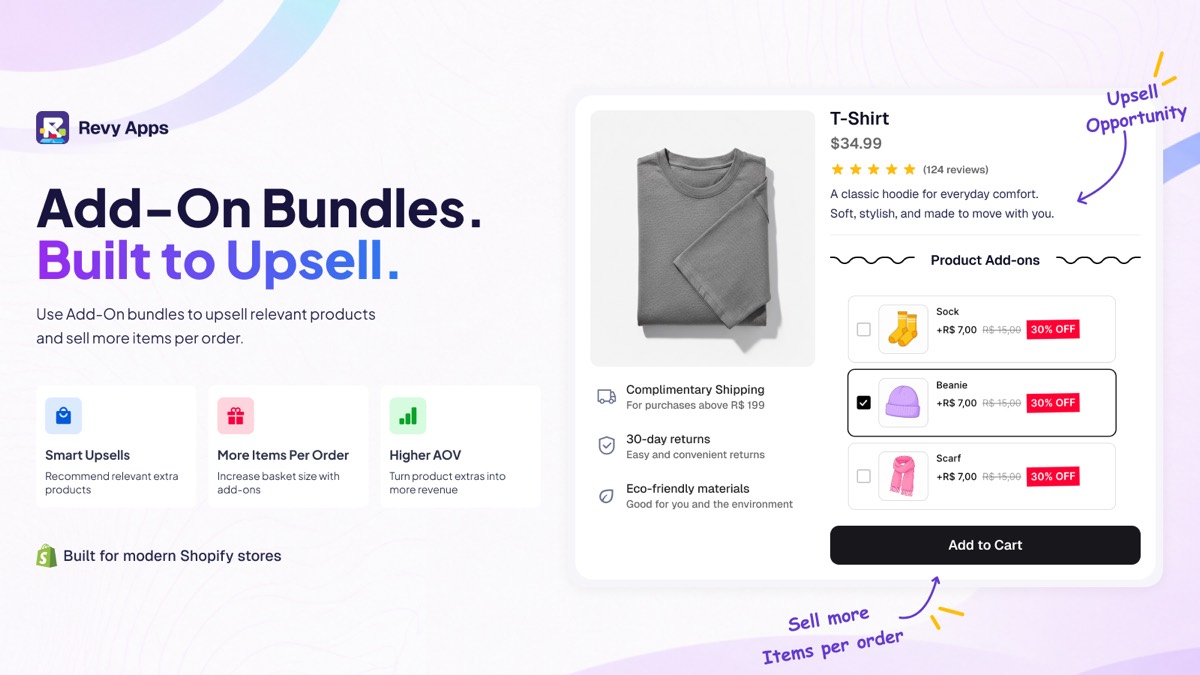
Both offers sell more inside the product page, before the shopper adds to cart. If you’d rather show upsell and cross-sell offers at the moment of add to cart, that’s what our other app, Unlimited Smart UpSell Offers, is for.
Where a bundle app falls short
Ours has two limits worth knowing before you install it.
Not every bundle type can become a bundle product yet. The others work as a discount on the real products in the cart. If every offer you sell has to exist as a separate product with its own stock, check which bundle types support it before you install any bundle app.
Offers show through an app block that you turn on in the theme editor. It needs no code, but it’s one more step than Shopify’s app.
Shopify Bundles app vs a bundle app, side by side
| Shopify Bundles | Unlimited Bundles & Discounts | |
|---|---|---|
| Fixed bundles of set products | Yes | Yes |
| Bundle product with stock from its items | Yes | Yes, for some bundle types |
| Offer widget on product pages | No | Yes, design set on the Appearance page |
| Mix and match | No | Yes |
| Quantity breaks | No | Yes |
| Gift bundles, shopper picks the gift | No | Yes |
| Add-on (upsell) bundles | No | Yes |
| BOGO offer on the product page | No, only Shopify’s Buy X Get Y discount | Yes |
| Shopify POS | Yes | Yes |
| Support | Help center FAQ | Live chat and email with the app’s developers |
| App Store rating, November 2026 | 2.9 out of 5 (571 reviews) | 4.8 out of 5 (720+ reviews) |
Which one should you pick?
Pick the Shopify Bundles app if you sell a few fixed kits, each one can live as its own product page, and you don’t need the offer shown anywhere else.
Pick a bundle app if shoppers should choose their own items, pay less per unit when they buy more, or see the offer next to the add to cart button, or if you want someone to answer when something goes wrong.
If you’re still not sure which one fits, ask us in live chat before installing anything. The people who build the app answer it, and we’ll tell you if Shopify’s free app is enough for what you sell. You can also see what we’ve shipped recently.