
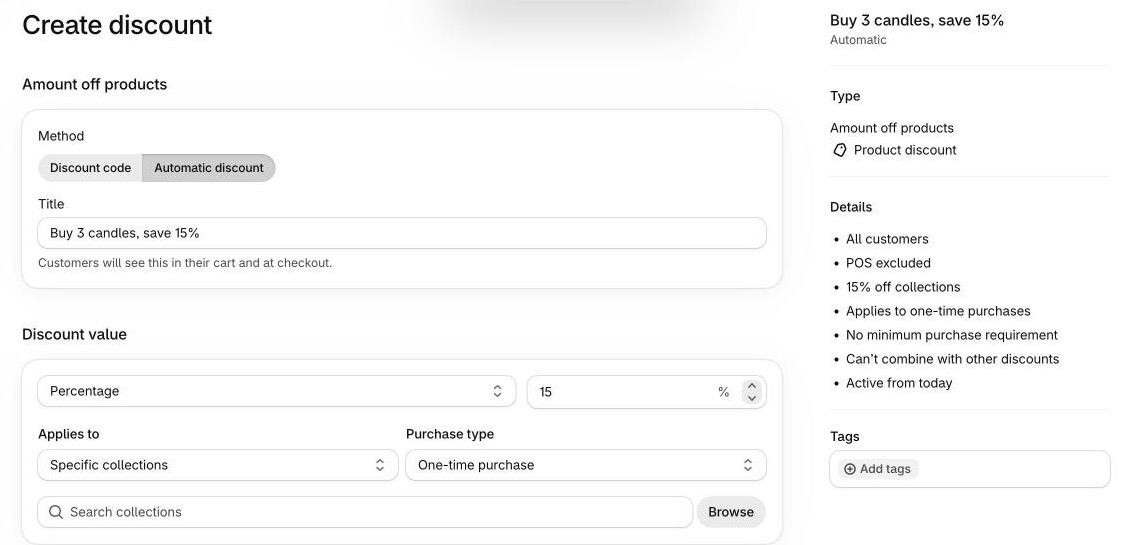
Shopify POS automatic discounts are discounts that apply on their own when staff ring up a sale in the Shopify POS app, with no code to type. Shopify’s own automatic discounts do this only at locations with a POS Pro subscription, and only after you tick “Apply on POS Pro locations” on the discount. Until then the discount summary says “POS excluded”, as in the screenshot above. At POS Lite locations they don’t apply at all. Discounts from apps built on Shopify Functions work differently. Shopify’s POS help says they always apply to both your online store and POS.
We build Unlimited Bundles & Discounts, a bundle app whose discounts run at POS, so we have a stake in this. What follows about Shopify’s own discounts comes from Shopify’s help center and developer docs, and from a discount we set up in a Shopify admin, all checked on November 24, 2026.
Why isn’t my automatic discount working on Shopify POS?
Most of the time the POS box isn’t ticked. Shopify applies automatic discounts on every sales channel “except for Point of Sale (POS), unless you activate it”, says its page on sales channel discounts. Open the discount, find the Eligibility section and tick “Apply on POS Pro locations”.
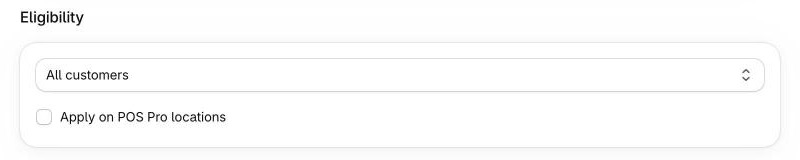
If the box is ticked and the discount still doesn’t show, check these next:
- The location is on POS Lite. Shopify’s help on amount off discounts says automatic discounts “aren’t available” in the checkout of POS Lite locations.
- It’s a Buy X Get Y discount on POS Lite. These work only in your online store checkout on Lite.
- The free item isn’t in the cart. Shopify never adds the “get” item of a Buy X Get Y discount for you, so staff have to scan it.
- The discount targets customer segments. Shopify identifies customers by email address or phone number, so add the customer to the sale before checkout.
- You hit the limit. A store can have 25 active automatic discounts, and app discounts count toward it.
Can you make a Shopify discount POS only?
Yes, on POS Pro or Shopify Plus. Automatic discounts are online only by default, so that direction needs nothing. For a discount that only applies in store, set its eligibility to Markets and choose a Retail market. Retail markets need POS Pro or Shopify Plus.
Shopify’s Spring ‘26 Edition announced in-store only discounts for codes too. The sales channel help page still says you can’t restrict where a discount code is redeemed, though, so test a code at the register before you print the sign.
Staff can always give a custom discount by hand, on one line or the whole cart. Two POS permissions, “Apply custom discounts” and “Apply discount codes”, can be set to allowed, denied or approval required. Approval required asks a manager to enter their PIN.
How do app discounts work at Shopify POS?
Since June 2024, discounts made with Shopify Discount Functions run in Shopify POS. Shopify’s POS discount overview says app discounts “will always apply to both your online store and the POS sales channel”, and that you can’t turn them off for one channel in Shopify’s settings. It names no POS Pro requirement for them.
The app itself can tell a sale at the register from an online one. Shopify’s Discount Function API gives every function the cart’s retail location, which is empty for online orders. So the switch for POS lives in the app’s settings.
In our app, bundle discounts apply to POS carts by default. If you want a bundle deal online only, one setting skips the discounts on POS checkouts.

Bundles and BOGO at Shopify POS
Shopify’s free Shopify Bundles app handles fixed bundles and multipacks, and since September 2024 you can publish those bundles to POS. A Shopify bundle is a product with its own price, so staff sell it by adding the bundle product. If you also run a discount on it, Shopify’s Bundles help says to include the parent bundle product, because “the discount won’t apply if you select only the component products”. For mix and match, the same changelog points to third-party apps.
Shopify’s own Buy X Get Y works at POS on POS Pro locations, with the box ticked and the free item scanned.
In Unlimited Bundles & Discounts the discount comes from what’s in the cart, so staff scan products the way they always do. Quantity breaks apply by tier, say 10% off 2 and 15% off 3. Fixed bundles and BOGO apply once every product of the offer is in the cart, and a mix and match bundle built from collections applies once the cart has an item from each collection.
Several bundles in one cart are combined into a single discount. All your bundles run through one automatic app discount, so they use one of Shopify’s 25 slots however many bundles you create.
Shopify POS automatic discounts compared
| Shopify automatic discount | Shopify Bundles | Unlimited Bundles & Discounts | |
|---|---|---|---|
| Applies at POS by default | No, tick “Apply on POS Pro locations” | Partly, once the bundle is published to POS | Yes |
| Works on POS Lite | No, POS Pro only | Yes, Shopify names no POS Pro rule | Yes, Shopify names no POS Pro rule |
| Can be turned off for POS only | Yes, untick the box | Yes, unpublish the bundle from POS | Yes, one setting |
| Staff just scan the items | Yes | No, staff add the bundle product | Yes |
| Quantity breaks | Partly, one tier per discount | Partly, as fixed multipacks | Yes, several tiers |
| Fixed bundles | Partly, as Buy X Get Y | Yes | Yes |
| Mix and match | Partly, a minimum quantity from collections | No, Shopify points to apps | Yes, across collections |
| BOGO | Yes, staff scan the free item | No | Yes |
| Combines with other discounts | Yes, per its combination settings | Partly, through a discount you add | Yes, order, product and shipping by default |
| One discount slot for all offers | No, one of the 25 slots each | Yes, a bundle uses no slot | Yes, one slot for all bundles |
Tips for staff at the register
With Shopify POS 11.5 or later, staff can scan a discount code’s QR code instead of typing it (applying discounts). Codes don’t work on exchanges.
Since March 2026, a discount tile on the smart grid lets staff pick a code from a list, and since October 2026 POS 11.17 can suggest tiles based on the discounts your staff use most (smart grid). App discounts can get a tile as well once they’re published to the POS channel.
If a sale has more than one discount, POS Pro combines automatic discounts and codes with the same rules and calculation order as online orders (combining discounts in POS). Custom discounts always apply. Once staff add one to a line, product discount codes can’t go on that item.
Questions merchants ask about POS discounts
Do I need POS Pro for discounts in store?
For Shopify’s own automatic discounts, yes. Shopify’s POS plan comparison lists discount codes on POS Lite as well, and for app discounts its POS help names no POS Pro requirement.
Can a bundle discount apply online and in store at the same time?
Yes. That’s the default for app discounts, and for Shopify’s own automatic discounts once the POS box is ticked on a POS Pro location.
How do I test a POS discount before a busy day?
Ring up a test sale on one register with the exact items of the offer, check the discount line on the cart, then clear the cart without taking payment. Do it once per location if your locations are on different POS plans.
For more on bundle types in general, see Shopify Bundles app vs a bundle app. If you’re not sure how a bundle will behave at your register, ask us in live chat. The people who build the app answer it.